 Talki Talki
One text to everyone. Private replies from each.
SMS broadcasts send a single message to up to 1,000 contacts from your business number — right now, or scheduled for a date and time in any timezone. It isn't a group chat: every recipient gets their own message, and their reply lands in their own conversation, on the web and in the mobile app.
- Up to 1,000 recipients
- Schedule in any timezone
- Per-person delivery status

What is an SMS broadcast?
An SMS broadcast (sometimes called a mass text, text blast or bulk SMS) is one message sent individually to a list of phone numbers from your own business line. Talki Talki sends it person by person, at the pace carriers expect from a real business number, and keeps a record for every recipient — sent, failed, or skipped, with the reason. Because each text is its own conversation, nobody sees anyone else's number or reply. Typical uses: open shifts for staff, appointment reminders, a closure or weather notice, a restock alert, a thank-you to regulars, an invitation to an event.
Everything in a broadcast
Built for a small team that needs to reach many people reliably — without spreadsheets or a marketing platform.
Paste a list or pick contacts
Paste numbers one per line or comma-separated, search your saved contacts, or reuse the people from any past broadcast. Duplicates and invalid numbers are caught before anything is sent.
Send now or schedule — in any timezone
Pick a date, a time, and the timezone it should go out in. Reaching staff in Vancouver at 9 a.m. Pacific and clients in Halifax at 9 a.m. Atlantic is two broadcasts, each set to its own zone. Up to 30 days ahead.
Replies stay private
Every recipient gets a normal text from your business number and replies into their own thread. You answer them one to one from Messages on the web or in the iOS and Android app.
Named groups
Give a broadcast a name — 'Saturday staff', 'VIP clients' — and it shows as that group in Messages and on the Broadcasts page. Rename any time, and send to the same group again from its tab.
Per-recipient status, never a silent failure
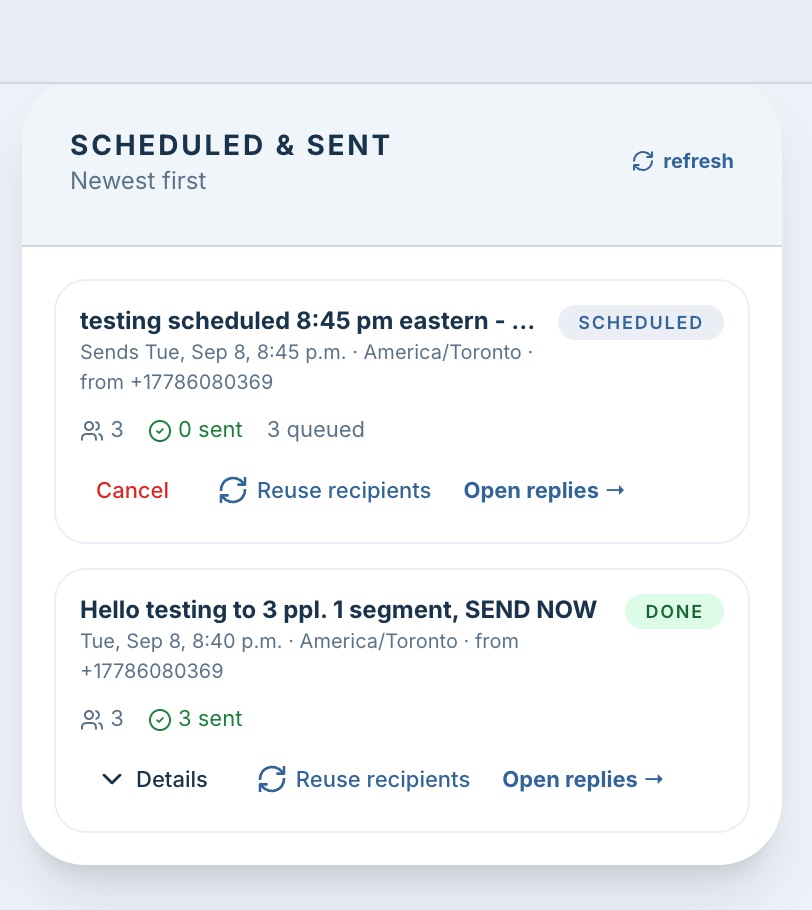
See sent, failed and skipped for every number with the reason. If one number can't be delivered, the broadcast skips it and continues. Retry only the failed ones with one click.
Runs on our servers
Close the tab, lose Wi-Fi, switch devices — the broadcast keeps sending and the scheduled one still goes out on time. Cancel a scheduled broadcast up to the moment it starts.
Know the cost before you press send.
Carriers bill texts in segments: up to 160 characters for a plain message, or 70 if it contains emoji or special characters — and a longer message is split into 153- or 67-character pieces. Talki Talki shows the segment estimate for your message and your recipient count as you type, only counts a segment when a text is actually sent, and pauses the broadcast rather than overspending if your monthly allowance runs out — resume after adding a pack. Texts you send and texts you receive both count, so leave room for replies.
Send a broadcast in 3 steps
Add recipients
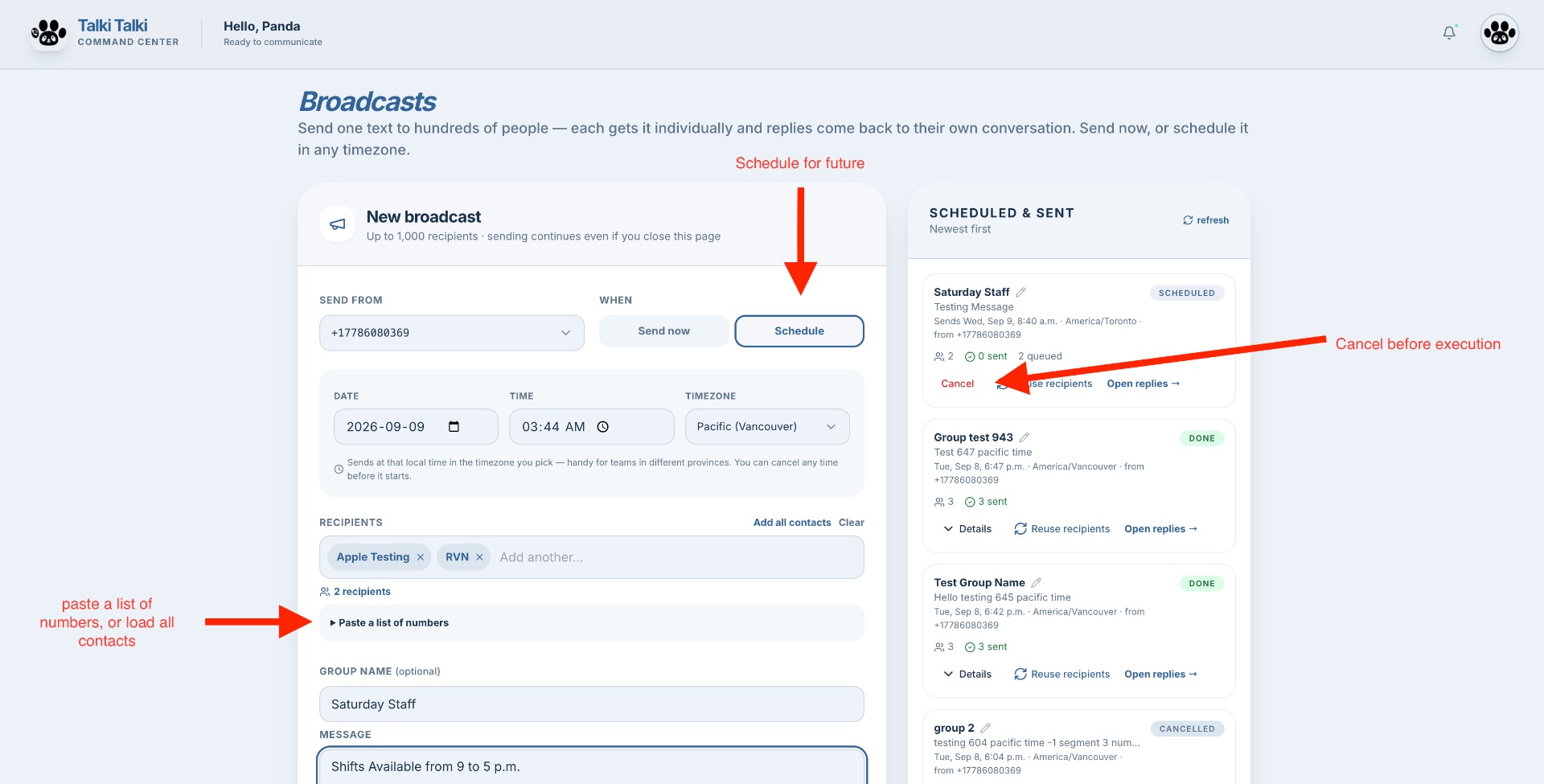
Dashboard → Broadcasts. Paste your list, pick contacts, or reuse a previous group. Choose the business number to send from.
Write and name it
Type the message and watch the segment estimate update. Optionally name the group so you'll find it later in Messages.
Send now or schedule
Send immediately, or pick a date, time and timezone. Watch delivery per person, retry any failures, and read replies in Messages.
What it looks like
The Broadcasts page: compose, schedule in any timezone, and track every send.
SMS broadcasts — FAQ
Is a broadcast the same as a group chat?
No. A group chat shows every number to everyone and every reply to the whole group. A Talki Talki broadcast sends each person their own private text from your business number, and their reply comes back only to you, in their own conversation.
How many people can I text at once?
Up to 1,000 recipients per broadcast. Messages go out one at a time at the pace carriers expect from a business number — roughly one per second — so a 300-person broadcast takes about five minutes. Sending continues on our servers even if you close the page.
Can I schedule a text for a specific timezone?
Yes. Every broadcast has its own date, time and timezone. Your business timezone is preselected, and you can choose any other — Pacific, Mountain, Central, Eastern, Atlantic, Newfoundland or anywhere in the world — up to 30 days ahead. Scheduled broadcasts can be cancelled until they start.
What is an SMS segment and how are they counted?
A segment is the unit carriers charge for. A plain text up to 160 characters is one segment; a message with emoji or accented characters is one segment up to 70. Longer messages are split into pieces of 153 (plain) or 67 (emoji) characters, and each piece is a segment. The Broadcasts page shows the estimate for your message multiplied by your recipients before you send. Only texts that are actually sent use segments — failed or skipped numbers don't. Inbound and outbound both count: a reply you receive uses a segment from the same balance as a text you send.
What happens if one number fails?
The broadcast skips it, records the reason, and keeps going. When it finishes you see exactly which numbers were sent, failed or skipped, and a Retry button re-sends only to the failed ones.
What happens when my monthly segments run out mid-broadcast?
The broadcast pauses instead of overspending and tells you why. Add a segment pack from Billing and press Resume — it picks up where it left off, with no duplicates.
Can I text US numbers?
Canadian numbers work right away. US numbers require A2P 10DLC registration, a carrier rule for business texting into the United States. Until your account is registered, US numbers in a list are skipped automatically and Canadian numbers still send. Activate A2P in Billing → Compliance Center.
Can I send to the same group again?
Yes. Open the group's tab in Messages and type a new message, or press 'Reuse recipients' next to any past broadcast to load its people into the composer — edit the list, then send now or schedule.
Where do replies go?
Into each contact's own conversation in Messages, on the web and in the Talki Talki iOS and Android apps, exactly like any other text to your business number. Each group also gets its own tab with the broadcast's status and an 'Open replies' shortcut.
Do I need consent to text people?
Yes — Canada's anti-spam legislation (CASL) requires consent for commercial messages. Broadcasts are made for people who already expect to hear from you: your staff, existing clients and customers who opted in. Include your business name and a way to opt out in your message.
Which plan includes broadcasts?
Broadcasts and scheduling are part of the Pro and VIP plans, which include a monthly segment allowance. Extra segment packs are available any time from Billing. See the pricing page for current allowances.
Reach everyone in one send
Bulk and scheduled texting from your Canadian business number — private replies, named groups, no surprises on cost.